
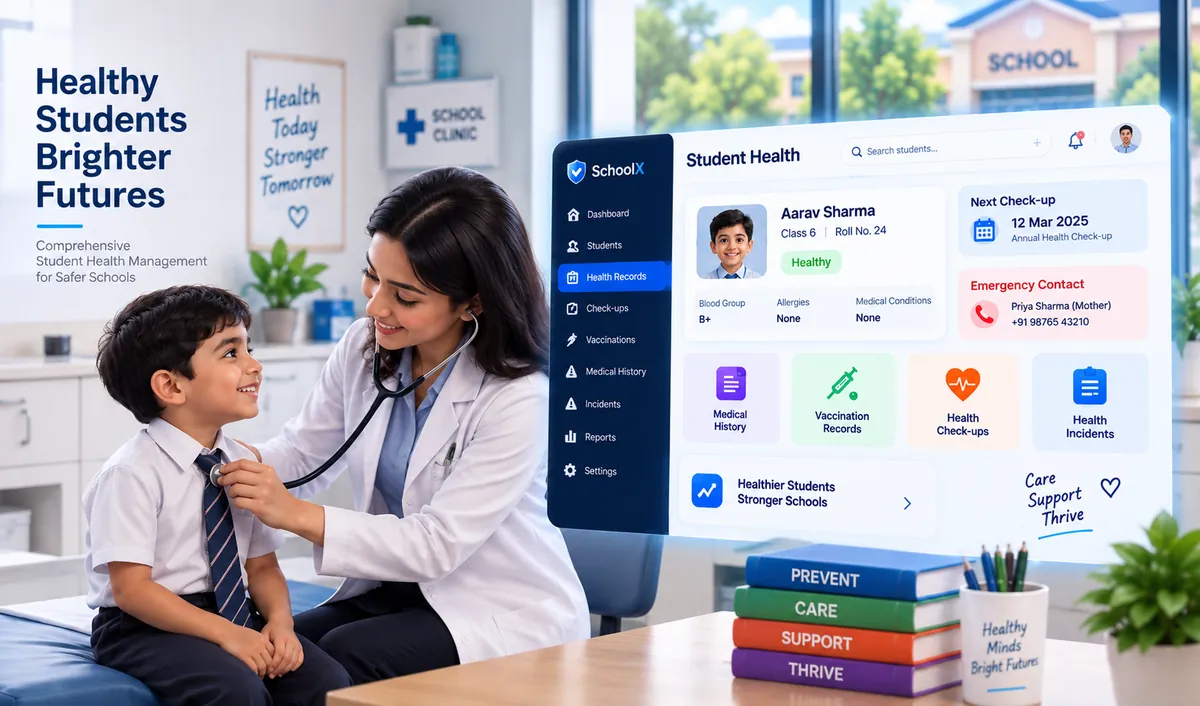
Student Health Management System: Complete Guide for Schools
Key Takeaways & Executive Summary
- The Problem: Student health information is often scattered across paper files, admission forms, and spreadsheets — making it slow to access and difficult to keep accurate.
- What It Does: A Student Health Management System centralizes health profiles, medical history, allergies, emergency contacts, vaccination records, health check-ups, incident records, and supporting documents in one digital platform.
- Key Principle: Schools should only maintain health information they genuinely need, with strict role-based access and clear data retention policies for this sensitive data.
- Best Approach: For schools using a school ERP, integrating health management within the same platform (alongside student records, attendance, and fees) avoids creating yet another disconnected system.
Table of Contents
- What Is a Student Health Management System?
- Why Do Schools Need One?
- Key Features of Student Health Management Software
- Benefits of a School Health Management System
- Manual Health Records vs Digital Health Management
- How Does Student Health Management Software Work?
- Student Health Management and School ERP
- What Should Schools Look for in Student Health Management Software?
- SchoolX ERP and Student Health Management
- Frequently Asked Questions (FAQs)
Schools are responsible for much more than academic development. While student attendance, academic performance, parent communication, and daily administration are all important, student well-being is equally critical. Schools may need to maintain health information, medical records, vaccination details, emergency contacts, health check-up records, and other relevant information. When these records are maintained through paper files or disconnected spreadsheets, keeping information updated and accessible can become very difficult.
A Student Health Management System provides a centralized way for schools to organize student health-related information and manage routine health administration digitally. Instead of searching through individual files whenever health information is required, authorized school staff can maintain relevant records in one structured system. For schools already managing student information, fees, and academics through a single platform, adding health management to the same environment is a natural next step.
This guide explains what a student health management system is, why schools may need one, its key features, benefits, and what schools should consider before implementing one.
What Is a Student Health Management System?
A Student Health Management System is a digital platform designed to help schools organize and manage student health-related information. Depending on the school's requirements and the capabilities of its school management software, the system can maintain information such as:
- Student health profiles
- Medical history
- Allergies and health conditions
- Emergency contact information
- Vaccination records
- Health check-up records
- Medication-related information
- Health incidents
- Doctor or nurse notes
- Health reports
The main purpose is to keep relevant student health information organized and accessible to authorized users. A school health management system can also reduce dependence on paper-based records and make it easier for administrators or designated health staff to find information when required — similar to how a school records management system centralizes other types of student documentation.
It is important to note that such a system is primarily a record-management and administrative tool. It should not be treated as a replacement for professional medical diagnosis or treatment.
Why Do Schools Need a Student Health Management System?
Student health information can be scattered across admission forms, paper records, spreadsheets, medical certificates, and other documents. This creates several administrative challenges. For example, a school may need to quickly check whether a student has a recorded allergy or review previous health check-up information. If the information is stored across different files, finding the correct record can take unnecessary time — especially during an emergency.
A centralized student health management system can help schools organize this information in one place. It can provide:
- Centralized student health records
- Faster access to relevant information
- Better record organization
- Reduced paperwork
- Easier record updates
- Structured health reports
- Controlled access to sensitive information
The same way that school administrative software reduces repetitive admin work across departments, a health management module can reduce the manual effort involved in maintaining and retrieving health records specifically. Schools that have already adopted a school ERP often find this to be the next logical area to digitize.
The objective is not to collect unnecessary health information. Schools should maintain only the information they genuinely need for legitimate educational, safety, or administrative purposes.
Key Features of Student Health Management Software
1. Student Health Profiles
A student health profile provides a structured location for storing relevant health information associated with a student. Depending on the school's policies, the profile may include basic health information, emergency contacts, allergies, medical history, and other relevant records. Keeping this information connected to the student's main school record — already maintained through the student management module — avoids maintaining completely separate files.
This can be particularly useful when administrators need to review student information quickly, or when a student is transferred between classes or sections tracked through the academics module.
2. Medical History Records
Students may have relevant medical information that the school needs to maintain for administrative or safety purposes. A school health management system can help authorized staff maintain historical health records in an organized format. Records may include information provided by parents, guardians, healthcare professionals, or the school health team, depending on the school's process.
Maintaining a history also makes it easier to understand how a student's recorded health information has changed over time — which can be especially relevant across multiple academic years tracked by the school academics management system.
3. Allergy & Special Health Information
Allergies and other important health information may require special attention within a school environment. A digital system can provide a structured way to record relevant information so authorized personnel can access it when necessary. For example, schools may maintain records related to:
- Food allergies
- Medication allergies
- Known medical conditions
- Special health requirements
- Relevant precautions
Because health information is sensitive, access should be restricted to appropriate personnel — a key reason why role-based permissions in a school management system matter so much in this context.
4. Emergency Contact Management
Emergency contact information is an important part of student records. A health management system can maintain parent or guardian contact details alongside relevant student information. Instead of checking multiple registers, authorized staff can access the required contact information through the student's digital profile — which may already be maintained through the school's student management software or parent communication module.
Schools should regularly review these records because contact details can change during an academic year. Parents can also update information directly through a school parent app, reducing the administrative burden on office staff.
5. Health Check-Up Records
Schools may organize periodic health check-ups or health screening activities. A digital system can help maintain records of these activities and associate the information with the appropriate students. For example, schools may record:
- Check-up date
- Type of check-up
- Basic observations
- Follow-up requirements
- Relevant documents
This creates a more structured record than maintaining separate paper forms for every health activity, and connects naturally to attendance records when a student is absent due to a health-related reason.
6. Vaccination Records
Where schools are required or permitted to maintain vaccination information, digital records can make organization easier. Authorized staff can store relevant vaccination details and supporting documents according to the school's policies and applicable requirements. A centralized system can also make it easier to identify records that require updating without searching through physical files.
Schools should define appropriate retention and access policies for such sensitive information — in line with the broader approach to school records management.
7. Health Incident Records
Minor injuries, health incidents, or other events may occur during school hours. A student health management system can provide a structured way to record relevant incidents. Depending on the school's workflow, an incident record could include:
- Student information
- Date and time
- Location
- Nature of incident
- Immediate action taken
- Parent or guardian communication
- Follow-up information
When an incident requires notifying parents, the record can be linked to the school's parent communication tools so that the relevant contacts are notified promptly without needing to search multiple systems for contact details.
8. Health Document Management
Schools may receive medical certificates, health reports, vaccination documents, or other supporting files. Instead of keeping all documents in physical folders, a digital system can provide organized document storage where appropriate. Documents should be handled according to the school's privacy, security, and retention policies — consistent with how other sensitive files are managed in a broader school document management approach.
The objective should be simple: store necessary documents securely and make them accessible only to authorized users.
Benefits of a School Health Management System
Centralized Health Information
Relevant student health information can be organized in one digital location instead of being distributed across paper files and spreadsheets — similar to how a student management system centralizes academic and personal records.
Less Administrative Work
Digital records can reduce repetitive paperwork and make routine record management easier, freeing up office staff who already handle admissions, fee collection, and general administrative tasks.
Faster Information Access
Authorized staff can find relevant student information more quickly when required — particularly important during health incidents or emergencies.
Better Record Organization
Health check-ups, incidents, medical information, and supporting documents can be structured instead of being maintained as disconnected records. This mirrors the organizational benefits seen across other modules in a modern school ERP system.
Improved Record Accuracy
Digital records can make it easier to update information when parents or guardians provide new details — especially when connected to the school's parent communication module or parent app.
Easier Reporting
Schools can organize health-related information into reports for administrative review where appropriate, without needing to manually compile information from multiple sources.
Better Coordination
When relevant information is accessible to authorized personnel, coordination between administrators, teachers, health staff, and parents can become more structured — supported by the school's communication tools and mobile app.
Manual Health Records vs Digital Health Management
Many schools still use paper forms, registers, and spreadsheets to maintain student health information. These methods are not automatically wrong. For a small school with limited records, a basic manual system may be sufficient. The problem appears when the volume of information increases.
| Aspect | Manual / Paper-Based | Digital Health Management System |
|---|---|---|
| Record storage | Physical files and folders | Centralized digital profiles per student |
| Information access | Requires physical search | Searchable by authorized users instantly |
| Record updates | Manual corrections on paper | Updated digitally with an audit trail |
| Document handling | Physical certificates in folders | Stored digitally with access controls |
| Access control | Hard to restrict who sees records | Role-based permissions enforced by system |
| Incident records | Paper forms, easy to misplace | Structured digital entry, linked to student |
| Scalability | Increasingly difficult as school grows | Scales without proportional admin overhead |
A student health management system provides a more structured approach by connecting relevant health information with student records. The biggest benefit is therefore not simply "going digital" — it is creating a consistent system for storing, updating, accessing, and managing health information responsibly. For more on how digital systems compare across different school operations, see our guide on how to choose the right school ERP software.
How Does Student Health Management Software Work?
A typical workflow can be relatively simple.
Step 1: Create the Student Profile
The student's basic information is already available through the school's student management system. The health module links to this existing profile rather than creating a duplicate entry.
Step 2: Add Relevant Health Information
Authorized personnel can record the health information that the school is required or permitted to maintain. Only staff with appropriate permissions — defined through role-based access controls in the school ERP — can view or edit this data.
Step 3: Upload Supporting Documents
Where necessary, relevant medical certificates or other documents can be stored with appropriate access controls, aligned with the school's overall school records management policy.
Step 4: Update Records
Health information should be updated when parents, guardians, or authorized professionals provide new information. Updates can be initiated through the parent app or communicated via the school communication platform.
Step 5: Record Health Activities
Check-ups, screenings, incidents, and other school health activities can be recorded as required and linked to the student's attendance record where relevant.
Step 6: Generate Reports
Authorized administrators can review relevant information through reports or dashboards where needed, supporting broader school administration decisions.
This creates a structured process rather than maintaining separate documents for every health-related activity — exactly the same logic that drives the shift to centralized school ERP platforms for all other administrative functions.
Student Health Management and School ERP
A standalone health application is not always necessary. For schools already using a School ERP, student health management can potentially become part of the broader student information system — one of the 30+ modules that make up a modern school ERP platform. This creates a connection between student health records and other school operations.
For example, a student's central profile may already contain information related to:
- Student management — personal details, class, section, parent information
- Attendance — daily presence, absence reasons
- Academic records — subjects, assignments, progress
- Examination results — marks, grades, report cards
- Fees — payment history, outstanding dues
- Parent communication — messages, notices, circulars
- Admission information — application, enrollment, documents
- Health information — health profiles, incidents, check-up records
An integrated platform can reduce the need for administrators to switch between several disconnected systems. However, integration should not mean that every employee can access every type of student information. Health information is sensitive, so role-based access and appropriate privacy controls are particularly important — just as they are for financial records and official school documents.
What Should Schools Look for in Student Health Management Software?
Choosing a student health management system should involve more than checking how many features the software offers. Schools should consider the following factors. For a broader framework on evaluating school software, see our guide on how to choose the right school ERP.
Data Security
Health information is sensitive. The system should provide appropriate authentication, permissions, and access controls — ensuring that health records receive the same level of protection as financial data and other confidential school information.
Role-Based Access
Teachers, administrators, health staff, and other users may have different responsibilities. The system should allow schools to control access accordingly — a standard capability in any well-designed school administrative platform.
Ease of Use
If entering or updating health information is unnecessarily complicated, staff may avoid using the system consistently. The same principle applies to every module in a school ERP — usability directly affects adoption.
Integration With Existing School Systems
If the school already uses a school ERP, the health module should ideally work with existing student records, attendance, communication, and admission modules instead of requiring duplicate data entry. An isolated health system creates the same fragmentation problem that schools are trying to move away from.
Document Management
Schools should be able to organize relevant health documents without creating unnecessary duplication — consistent with broader school records management best practices.
Parent & Guardian Access
Where appropriate, parents should be able to view or update certain health information through a parent app or portal, reducing the need for repeated form submissions and keeping records current.
Privacy & Data Retention
Schools should establish clear policies around what health information is collected, who can access it, how long it is retained, and when it should be removed — in the same way that all school records require defined retention and disposal policies.
SchoolX ERP and Student Health Management
SchoolX ERP provides a centralized school management environment where student information, academics, attendance, fees, communication, and other administrative processes can be organized through connected modules. For schools planning to introduce digital student health management, the important requirement is not simply storing more information — it is maintaining relevant records in an organized system while ensuring that sensitive information remains accessible only to appropriate users.
By connecting student health information with the broader school administration environment, an integrated ERP approach can help reduce fragmented records and repetitive data entry across all school operations. Our School Management Software page covers the full platform, or you can explore all 30+ ERP modules to understand how health management fits into the bigger picture.
If you'd like to see how student health management fits within the broader platform, book a free demo with SchoolX today.
Frequently Asked Questions (FAQs)
No. A student health management system is an administrative tool designed to help schools organize health-related information such as health profiles, emergency contacts, vaccination records, and health check-up notes. It is not a clinical or medical records system and should not be used for medical diagnosis or treatment.
Access should be role-based and limited to authorized personnel who have a legitimate need to view or manage health information. This may include designated health staff, specific administrators, or teachers in limited circumstances, but should not be open to all school employees.
Yes. For schools already using a school ERP, student health management can be integrated as a module within the same platform, connecting health information with the student's existing profile without requiring a separate standalone application.
Schools should only collect health information they genuinely need, restrict access through role-based permissions, and establish clear policies for how long health data is retained and when it should be removed or archived.
Schools should define a clear data retention policy that specifies how long student health records are kept after a student leaves, when records are deleted or archived, and what information (if any) is transferred to another institution.
Final Thoughts
Student health information deserves the same level of organization and responsibility as other important school records. A Student Health Management System can help schools move away from scattered paper files and spreadsheets toward centralized digital records. From student health profiles and medical history to health check-ups, emergency contacts, incidents, and supporting documents, the right system can make routine health administration easier to manage.
However, schools should avoid collecting health information simply because the software allows it. The focus should remain on necessary information, controlled access, accurate records, and responsible data management. For schools already adopting a School ERP, integrating student health management with the broader student information system, communication tools, and parent app can provide an additional layer of organization without creating another disconnected platform. Book a free demo with SchoolX to see how it works in practice.