
School Database Management Software: Complete Guide for Schools
Key Takeaways & Executive Summary
- Purpose: School database management software provides a centralized digital system for storing, organizing, updating, and retrieving student and school information.
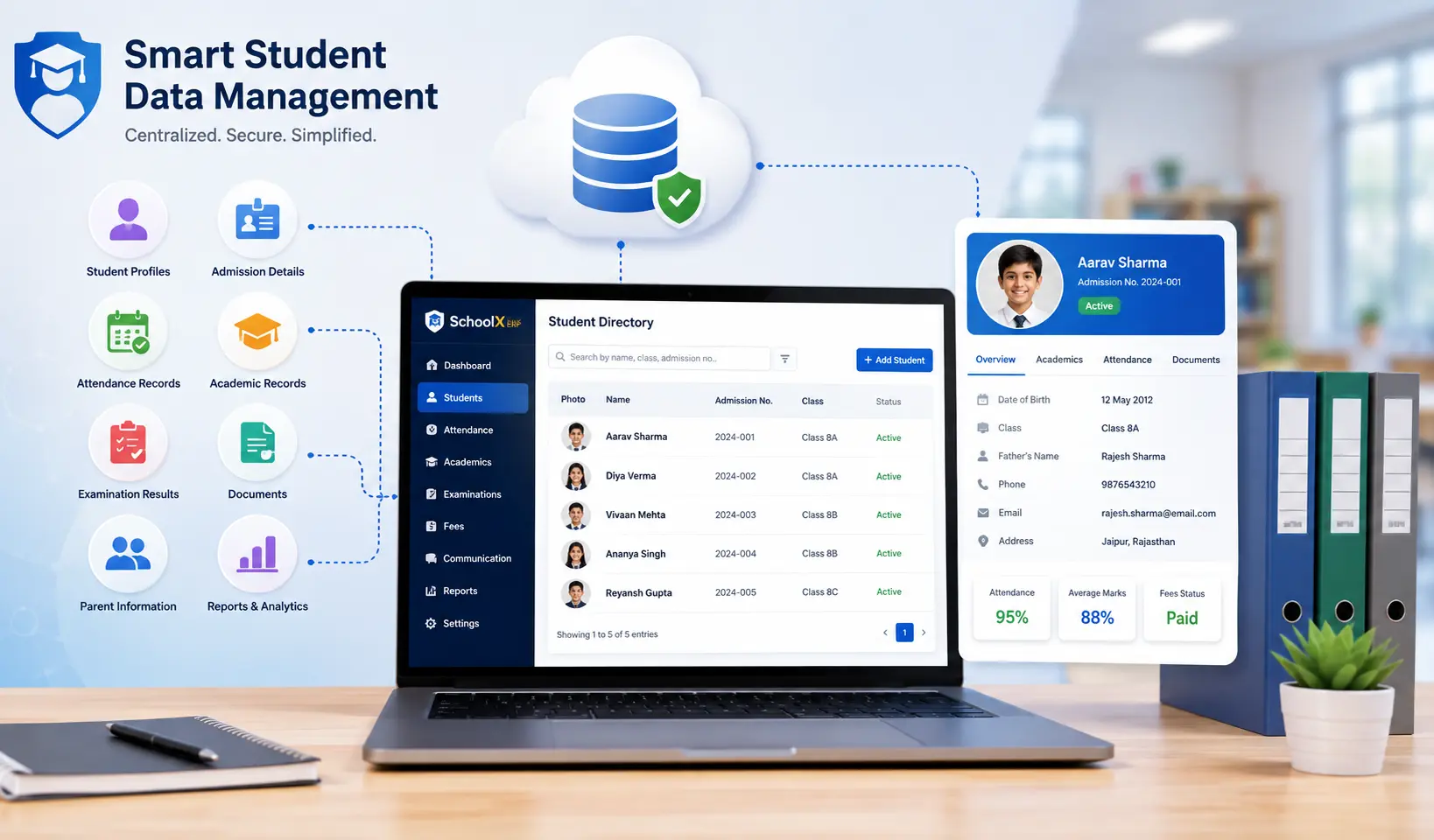
- Key Features: Centralized student database, record management, admission data, academic records, attendance, examinations, parent information, search & filters, document management, and role-based access control.
- Benefits: Faster access to records, reduced admin work, better organization, easier reporting via MIS, and improved data consistency.
- Solution: SchoolX ERP brings student records together with academics, attendance, fees, homework, and communication in one connected platform.
Table of Contents
- What Is School Database Management Software?
- Why Do Schools Need a Student Database Management System?
- Problems With Managing School Data Manually
- Key Features of School Database Management Software
- Benefits of School Database Management Software
- Student Database Management vs Excel
- School Database Management Software and School MIS
- How to Choose the Right School Database Management Software
- How SchoolX ERP Can Help Manage School Data
- Best Practices for Managing Student Data
- Frequently Asked Questions (FAQs)
- Conclusion
Schools manage a large amount of information every day. Student profiles, admission details, attendance, examination results, academic records, parent information, and documents all need to be stored and updated regularly.
When this information is spread across paper registers, Excel files, and different applications, finding the right record can take time and maintaining accurate information becomes more difficult.
School database management software provides a centralized way to store, organize, update, and retrieve school data. It gives authorized users access to relevant student and administrative information without requiring them to search through multiple physical files or spreadsheets.
For schools moving toward digital administration, a reliable student database management system can become an important part of a broader school ERP.
What Is School Database Management Software?
School database management software is a digital system that helps schools store, organize, manage, and retrieve information related to students and school operations.
At its core, the software maintains a centralized database where different types of information can be connected to the appropriate student, class, teacher, or academic session. A school database may contain:
- Student personal information
- Admission records
- Parent and guardian details
- Class and section information
- Academic records
- Attendance records
- Examination results
- Homework and assignment information
- Fee records
- Documents and certificates
- Teacher and staff information
Instead of maintaining these records independently, a school database management system allows authorized users to access related information from a centralized platform. The main purpose is not simply to store more data. It is to make school information easier to find, update, manage, and use.
Why Do Schools Need a Student Database Management System?
Student information changes throughout the academic year. Students may move to new classes, update contact information, participate in examinations, receive new grades, or change other academic and administrative details.
Managing these changes manually can result in duplicate records, outdated information, or unnecessary administrative work.
A centralized student database management system can provide one reliable location for maintaining student records. For example, when a teacher or administrator needs information about a student, they can search the student's profile rather than checking multiple registers or files.
This becomes particularly useful for schools with hundreds or thousands of students.
Problems With Managing School Data Manually
Paper records and spreadsheets are still used by many schools because they are familiar and inexpensive. However, they can become difficult to manage as the amount of information increases.
Scattered Information
Student information may be stored in admission registers, Excel files, attendance records, examination sheets, and separate folders. This makes it difficult to get a complete picture of a student's information quickly.
Duplicate Data Entry
The same student information may need to be entered into multiple files or systems. Repeated data entry increases administrative effort and can introduce inconsistencies.
Difficult Searching
Finding an old student record in a physical register can take time. Searching through multiple spreadsheets can also become inconvenient when the data grows.
Updating Records
When a student's contact information or class details change, staff may need to update the information in several places.
Limited Accessibility
Paper records can only be accessed where they are stored. Digital systems — especially cloud-based solutions — can provide authorized users with access to information from appropriate devices and locations.
Reporting Takes Longer
Preparing reports manually often requires collecting information from several sources. A centralized database can make this process more efficient.
Key Features of School Database Management Software
A useful school database management system should make student information easier to manage without adding unnecessary complexity.
1. Centralized Student Database
The foundation of the system is a centralized student database. Each student can have a digital profile containing relevant personal, academic, and administrative information. This gives authorized users a consistent source of information instead of requiring them to maintain multiple records.
2. Student Record Management
Student record management allows schools to maintain important information throughout a student's time at the institution. Records may include personal details, academic history, class information, attendance, examination results, and other relevant data. Keeping this information together makes it easier to retrieve a student's complete record when required.
3. Admission Data Management
Student data often begins with the admission process. A school database can store admission-related information and connect it to the student's profile after enrollment. This reduces the need to repeatedly enter the same information into different systems.
4. Academic Records
Academic information is an important part of a student's digital record. Schools can maintain details such as subjects, grades, examination results, academic sessions, and other relevant information. When academic records are connected to the student database, teachers and administrators can review a student's progress more easily.
5. Attendance Records
Attendance information can also be associated with student profiles. Teachers and administrators can access attendance history while reviewing other student information. Schools using RFID-based attendance systems can further automate this process. This can be particularly useful when schools want to understand student participation alongside academic performance.
6. Examination Records
Examination marks and results create an important historical record for students. A digital database can maintain examination information across different assessments and academic years, making it easier to review previous performance.
7. Parent and Guardian Information
Schools regularly need to communicate with parents and guardians. A student database can store relevant parent information and associate it with the appropriate student profile. This makes it easier for authorized staff to access contact information when communication is required.
8. Search and Filters
A large database is only useful if users can find information quickly. Search and filtering tools can allow staff to locate students based on criteria such as name, admission number, class, section, academic session, or other available fields. This can save considerable time compared with searching through physical records.
9. Document Management
Schools often need to maintain documents related to students, such as certificates, admission documents, identification records, or other academic paperwork. Where supported, digital document management can keep relevant files associated with the student's profile instead of storing them separately.
10. User Roles and Access Control
Not every employee needs access to every student record. A school database management system should provide appropriate user roles and permissions. For example, teachers may need access to academic and attendance information, while administrative staff may require access to admission or documentation records. Role-based access helps schools control who can view or modify particular information.
Benefits of School Database Management Software
Centralized Information
The biggest benefit is having relevant information in one organized system. Instead of maintaining separate files for every activity, schools can connect information to a student's central profile.
Faster Access to Records
Teachers and administrators can search for student information without manually checking registers or multiple spreadsheets. This is especially useful when staff need information quickly during meetings, parent communication, or administrative work.
Reduced Administrative Work
Digital records reduce repetitive tasks such as copying student information between different files. Information entered once can potentially be used across connected modules, depending on the system.
Better Record Organization
A structured digital database makes it easier to maintain records throughout the student's academic journey. Historical information can remain accessible rather than being separated into different physical files for different academic years.
Easier Reporting
When student information is centralized, schools can generate relevant reports more efficiently. Administrators can use student data for academic, attendance, examination, and other management reports.
Improved Data Consistency
A centralized database can reduce unnecessary duplication and help maintain consistent information across connected school modules. However, software alone cannot guarantee accurate data. Schools still need proper data-entry procedures and regular verification.
Student Database Management vs Excel
Excel can be useful for maintaining small datasets, but it becomes harder to manage when student information grows and multiple departments need access to the same data. Schools still relying on spreadsheets may want to learn about migrating from Excel to a school ERP.
A dedicated school database management system is designed specifically for structured school information and can connect student records with other school processes.
For example, a student's profile can be connected with attendance, examinations, academic performance, homework, and other information within a broader school ERP.
This reduces the need to maintain separate spreadsheets for every activity. The choice ultimately depends on the size and requirements of the school. A small institution with limited data may manage basic records with spreadsheets, while larger schools generally benefit more from a centralized database system.
School Database Management Software and School MIS
A school database management system and a School Management Information System (MIS) serve related but different purposes.
The database focuses primarily on storing and managing structured information. MIS uses school data to create reports, dashboards, analytics, and information that can support management decisions.
In a modern school ERP, these functions can work together. For example:
Student Database → Attendance & Exam Data → MIS Reports → Management Insights
This means the quality of MIS reporting depends partly on the quality and organization of the underlying school data.
How to Choose the Right School Database Management Software
Schools should evaluate software based on their actual requirements rather than selecting a system simply because it offers a large number of features. For a detailed evaluation framework, see our guide on how to choose the right school ERP software.
Ease of Use
Teachers and administrative staff should be able to search, update, and manage student information without complicated procedures.
Data Security
Student information should be protected through appropriate authentication, access controls, permissions, backups, and secure data management practices.
Integration
The database should ideally connect with other important school functions such as admissions, attendance, academics, examinations, fees, homework, and communication.
Search and Reporting
Staff should be able to quickly find records and generate useful reports from stored information.
Scalability
The system should be able to handle the school's current student population and future growth. Schools considering deployment options should also compare cloud vs on-premise school ERP solutions.
Data Migration
If a school is moving from Excel or another existing system, it should understand how existing records will be transferred, checked, and organized. Poor-quality data should not simply be moved into a new system without verification.
How SchoolX ERP Can Help Manage School Data
SchoolX ERP provides a centralized environment for managing academic and administrative school information.
Student records can work alongside other school processes such as admissions, attendance, academic management, examinations, homework, fees, and communication.
This connected approach means schools do not have to treat the student database as an isolated system. For example, a student's basic profile can be connected with attendance records and examination results, while academic and performance information can be used for reporting and analysis.
For administrators and principals, this can provide a more organized view of school information while reducing dependence on disconnected spreadsheets and physical records.
The value of a centralized system ultimately depends on how well the school maintains its data and how consistently staff use the platform.
Best Practices for Managing Student Data
Implementing database software is only the first step. Schools also need proper processes for maintaining information.
Keep data accurate. Student records should be reviewed and updated when information changes.
Avoid unnecessary duplication. If the same information is maintained in multiple places, inconsistencies can develop.
Define access permissions. Users should only have access to information relevant to their responsibilities.
Back up important information. Schools should understand the backup and recovery capabilities of their chosen platform.
Train staff. Teachers and administrators should understand how to enter, update, search, and manage records correctly.
Review old data before migration. Duplicate, incomplete, or outdated records should be identified before importing information into a new database.
Frequently Asked Questions (FAQs)
School database management software is a digital system used to store, organize, update, search, and manage student and school information in a centralized database.
A student database management system maintains student-related information such as personal details, admission records, academic history, attendance, examination results, and parent information in an organized digital system.
It can replace spreadsheets for many school data-management requirements, particularly when schools need multiple users, structured student records, access control, reporting, and integration with other school systems. Learn more about migrating from Excel to a school ERP.
Yes. Student database management is commonly an important component of a broader school ERP because other modules such as attendance, examinations, academics, and fees may need access to student information.
It gives administrators faster access to organized student and school information and can simplify reporting, record maintenance, and day-to-day administrative tasks.
Security depends on the software and how the school configures and uses it. Schools should evaluate authentication, user permissions, access controls, backups, and data protection practices before selecting a system.
Conclusion
Managing student information becomes increasingly difficult when records are spread across paper registers, spreadsheets, and separate applications.
School database management software provides a centralized way to store, organize, search, update, and manage school information. A well-structured student database management system can support student records, admissions, academics, attendance, examinations, parent information, documents, and reporting.
The real benefit comes from connecting this information with other school operations. When a student database works together with academic management, attendance, examinations, homework, fees, and MIS reporting, schools can create a more organized digital environment.
For schools considering a move away from manual records or disconnected spreadsheets, the right database solution should be secure, easy to use, scalable, and capable of integrating with the school's broader management system.
SchoolX ERP brings student and school information into a connected platform, helping schools move toward more organized digital record management and more efficient school administration.